

Table of Contents
Don't have the time to read the entire post? Our human writers will be sad, but we understand. Summarize the post with your preferred LLM here instead.
Protocols and standards like Open Authorization (OAuth 2.0) and OpenID Connect (OIDC) rely on tokens rather than traditional credentials to grant users access to sensitive resources. In the context of OAuth, there are two types of tokens: access and refresh. Access and refresh tokens can utilize several formats, but the most common form for both is the JSON Web Token (JWT).
These two types of tokens are similar and work in concert rather than in competition with one another. However, it’s important to understand the distinctions between them to appreciate how they facilitate a smoother and more secure login process through standards like OAuth and OIDC.
To that end, this guide will cover:
What an access token is
What a refresh token is
How the tokens compare
When to use each token
What is an access token?
An OAuth access token is a digital asset, typically a JWT, that facilitates seamless access to resources via OAuth and other passwordless authentication configurations. In practice, access tokens act as keys that allow users to access sensitive information without repeated login requests.
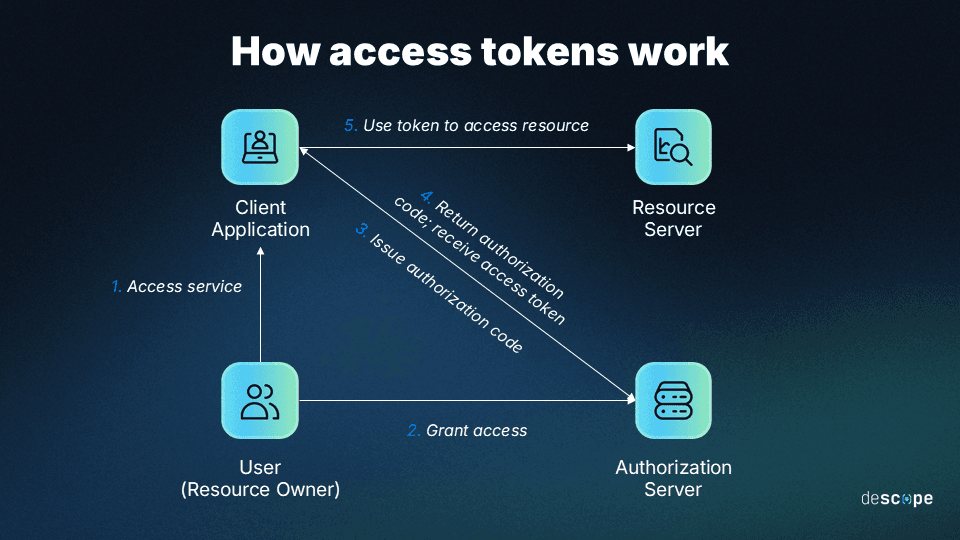
The typical process for authorization through access tokens goes like this:
A client app requires authorization from a user to grant them access
The user permits an authorization server to send an authorization code to the client
The authorization server issues an access token upon client request
The client validates the token and grants the user access to resources
Generally speaking, the functionality of access tokens is determined by the specific resource and authorization server being used. But some kinds, like “bearer tokens,” always have the same function: providing access to the individual who possesses (bears) the token.
In many web apps, the access token is stored in a secure, HTTP-only cookie or browser memory and sent with API requests to prove the user is authenticated. For the duration of a user's session, the token allows their identity to be retained or “remembered,” so no further logins are required.
Access tokens usually have very short lifespans; in many cases, they last only a few hours. For example, access token lifespans in Microsoft’s identity platform are between 30-90 minutes by default. Token expirations are also variable, assigned randomly to a value in the range.
The reason access tokens are short-lived is to minimize the attack surface for cybercriminals and threat actors. The less time a token is active, the fewer opportunities there are for an attack.
What is a refresh token?
Refresh tokens extend the lifespan of an access token. Typically, they’re issued alongside access tokens, allowing additional access tokens to be granted when the live access token expires. The refresh token is usually stored securely on the authorization server itself.
Refresh tokens work together with access tokens to facilitate long-lived sessions without repeated logins. In practice, the way they’re generated and function follows these steps:
Users log in to a client application and get authenticated via an auth server
The server issues an access token to the user, along with a refresh token
The access token grants the user access up until its designated expiration
The refresh token kicks in upon expiry to request a new user access token
The auth server grants a new access token by validating the refresh token
Refresh tokens are not useful independently of access tokens—there’s no such thing as a refresh token without an access token. They are used exclusively in relation to them. They’re also not strictly necessary, and some apps can use OAuth without them. However, they do provide benefits in terms of a smoother user experience (UX) and enhanced security.
Another major differentiating factor for refresh tokens is that they last much longer than access tokens. For example, refresh tokens in Microsoft’s identity platform have default and rigid (non-configurable) lifespans of 90 days for most scenarios and 24 hours for single-page apps.
For added security, developers can use refresh token rotation to automatically issue a new refresh token and invalidate the old one when a new access token is generated. This best practice is most useful in situations where access sessions typically span long durations or where there is an increased risk of old refresh tokens being stolen or otherwise abused.
Comparing access tokens vs refresh tokens
Baseline access is provided in the form of access tokens, whereas refresh tokens play a key role in maintaining sessions through extended periods of use.
As noted, access tokens and refresh tokens are not separate entities. They work together in cases where refresh tokens enable seamless and secure long-term authentication.
That said, they are distinct. Here’s how the two tokens stack up across three critical factors:
| Access Tokens | Refresh Tokens |
|---|---|---|
User experience/interface | Authenticate and authorize users up-front | Users are re-authorized without re-authenticating |
Transmission and storage | Tokens are sent over secure channels (HTTPS) and then stored on client servers | Tokens are sent over HTTPS, like access tokens, but stored on the authorization server |
Security considerations | Short life spans, encryption, and the ability to revoke access power strong security | Longer life spans are offset by less frequent refreshes and greater revocation ability |
Expiration | No more than a few hours; 30–90 minutes is a gold standard | Longer than access tokens; typically multiple days |
Storage location | Browser memory or local storage | Stored on the auth server |
Scope | Access to resources or systems | Refreshing expired access tokens |
Revocation behavior | Typically non-revocable beyond the set expiration timeline | Revocable by design to deny access by not refreshing |
Exposure risk | Short-term exposure if access tokens are misused or stolen | Less immediate risk, especially when rotated effectively |
Token refresh process involvement | Automatically expires after a set duration, then regenerates upon validation of a refresh token | Triggers upon access token expiration, requesting a refresh, which is granted upon validation |
Ultimately, access and refresh tokens are two sides of the same coin. Access tokens grant users access to resources, and refresh tokens extend session continuity to maintain seamless access.
With these differences in mind, the token you prioritize for your auth depends on your use case.
How does OAuth token refresh work?
OAuth token refresh follows the same basic steps outlined above for access token and refresh token flows, leveraging OAuth-specific mechanisms for user authentication and validation.
In practice, the OAuth access token and OAuth refresh token flows work as follows:
A user tries to access sensitive data from a client using an OAuth-based system
The client (an app or website) requests authorization from an auth server
The auth server gets approval from the user for the client request
The auth server redirects to a client-provided URL with an auth code
The client presents the required information to a token endpoint on the auth server
The client receives an access and refresh token, pending verification of information
The client presents the access token to a resource server, providing access
If and when the original access token expires, the refresh token triggers
The auth server validates the refresh token and issues a new access token
This process allows for a seamless token refresh and session continuity for trusted users. It maintains strong security assurance without adding friction that can compromise UX.
When to use each type of token
Using access and refresh tokens together is one of the best options if you’re considering a passwordless auth solution for your next software project. Some of their optimal use cases are situations where users require access to shared resources. When users require authentication to access or modify files owned by others, access tokens can streamline this process.
Here are the situations in which access and refresh tokens are most apt, respectively:
When access tokens alone are sufficient – Short-lived sessions, internal tools, or high-security environments where users are expected to re-authenticate frequently.
When refresh tokens are recommended – Mobile apps, SPAs, and B2B SaaS products where users expect persistent sessions without repeated logins.
In most cases, when you use access tokens, it’s also sensible to use refresh tokens.
For example, if users are likely to remain logged in for extended periods (or indefinitely), forcing them to re-authenticate regularly could cause friction. Refresh tokens remove that necessity without compromising on security—provided they’re used securely, such as with rotation.
However, there are also cases wherein extended access is optional. For example, for users who log in to a system infrequently and for short durations, refresh tokens might not be needed.
Security best practices for OAuth access and refresh tokens
OAuth access tokens and refresh tokens are inherently sensitive. The former grants immediate access to resources, which may be protected, and the latter extends that access for longer periods of time. While they have inherent security features, developers can and should implement these tokens carefully and consider best practices for enhancing their security.
Here are the highest-impact considerations for implementing these tokens effectively:
Limit lifespans – Use the shortest lifespan possible for access and refresh tokens to shrink the attack surface, but avoid making access sessions so short that it hurts UX.
Minimize scopes – Ensure tokens provide access to the least amount of sensitive information as is necessary to limit the attack surface while satisfying user requests.
Use trusted protocols – Transmit access and refresh tokens over Hypertext Transfer Protocol Secure (HTTPS) to ensure they’re insulated from interception by cybercriminals.
Store tokens securely – Use trusted storage mechanisms for access and refresh tokens, limiting exposure on the client side and preferring cryptography or HTTP-only cookies.
Leverage rotation and revocation – For refresh tokens specifically, use token rotation to ensure swift and frequent revocation is extended to any non-revocable access tokens.
Ultimately, the best way to get the most out of access and refresh tokens is to leverage a powerful, flexible auth platform that accommodates them and many other login methods.
Drag & drop authentication with Descope
Access and refresh tokens are indispensable parts of modern auth processes. By understanding and implementing these tokens, organizations can provide a frictionless and secure experience for their end users. And, in most cases, that means utilizing both access and refresh tokens.
The best way to implement access and refresh tokens is with a powerful, flexible auth platform like Descope. Our no/low code CIAM platform helps organizations easily add authentication, authorization, and identity management to their apps using drag-and-drop workflows.
Sign up for a Free Forever account and start building secure, scalable authentication flows today. Have questions about access or refresh tokens? Book time with our experts.